更新時間:
產品內容
Second Copy能夠將資料備份到另外一個資料夾、硬碟或是網路上的另外一台電腦,然後它會自動監控原始檔案與備份檔,當原始的檔案有所變動它就會自動把被變動過的部份進行備份。
Second Copy® arranges your backup needs in sets of "profiles." Each profile is a set of file and folder specifications which tells Second Copy®, what you want to be copied, to where, and when. Once configured, Second Copy® monitors the "source" folders for changes or updates and copies new or changed files to the "destination". This process is done unobtrusively in the background.
Second Copy® includes an easy to use profile wizard that guides you through the setup process. The setup process is separated into Express and Custom modes. In Express mode, you answer three simple questions (what, where and when) about the files to be backed up.
Advanced users can use the Custom setup option to define specific files to be included in or excluded from the copy. They can also choose how the files are to be copied, e.g. compression, synchronization etc.
The compression option also offers up to 256-bit AES Encryption. Files can be copied using FTP. Second Copy® can send an e-mail notification after running the backup.
Second Copy® is a full 32-bit multi-threaded program which lets you tailor the performance by controlling the priority of the background processes.
http://www.accesssoft.com.tw/pro_con.php?idept=8&isdept=8&pk=212
您的意見是我們重要的資產,感謝您的支持與愛護!
藝廊
Second Copy® is our award winning backup software. Designed for all versions of Windows (including Windows 7), it offers easy and powerful ways of making backups of your important files and folders.
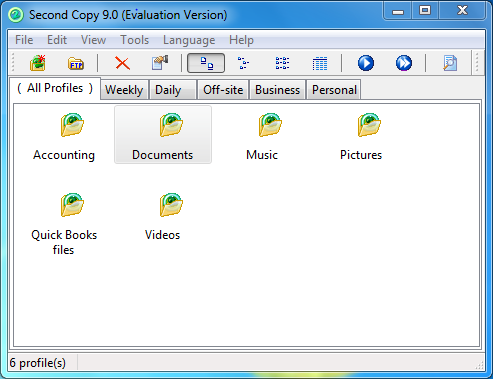
Second Copy® arranges your backup needs in sets of "profiles." Each profile is a set of file and folder specifications which tells Second Copy®, what you want to be copied, to where, and when. Once configured, Second Copy® monitors the "source" folders for changes or updates and copies new or changed files to the "destination". This process is done unobtrusively in the background.
Second Copy® includes an easy to use profile wizard that guides you through the setup process. The setup process is separated into Express and Custom modes. In Express mode, you answer three simple questions (what, where and when) about the files to be backed up.
Advanced users can use the Custom setup option to define specific files to be included in or excluded from the copy. They can also choose how the files are to be copied, e.g. compression, synchronization etc.
The compression option also offers up to 256-bit AES Encryption. Files can be copied using FTP. Second Copy® can send an e-mail notification after running the backup.
Second Copy® is a full 32-bit multi-threaded program which lets you tailor the performance by controlling the priority of the background processes.
http://www.accesssoft.com.tw/pro_con.php?idept=8&isdept=8&pk=212
您的意見是我們重要的資產,感謝您的支持與愛護!
AccessSoft 群昱股份有限公司-最優質的軟體代理商-Your Brilliant Solutions Provider
若您有任何軟體相關需求,歡迎您與我們連絡!
www.accesssoft.com.tw
TEL: 04-23052979
FAX: 04-23052997
E-mail: info@accesssoft.com.tw 歡迎寫信詢價!

公司資訊
- 統一編號53047790
- 聯絡人陳小姐
- 更多群昱股份有限公司資訊
網頁更新日:
相關產品


-
網網相連
- 寶工實業股份有限公司
- 台谷動力科技股份有限公司
- 謙益工程行
